FOR WINDOWS · PROCESSED ON YOUR PC
Your video.
Under the limit.
The clip is ready. The file is too big.
Drop it in, set a maximum size, and get an MP4 you can send.
No subscription.
Windows 10/11, 64-bit · internet needed for first setup
Make it fit for Windows
SKIP THE VIDEO SETTINGS
From “too large”
to ready to send.
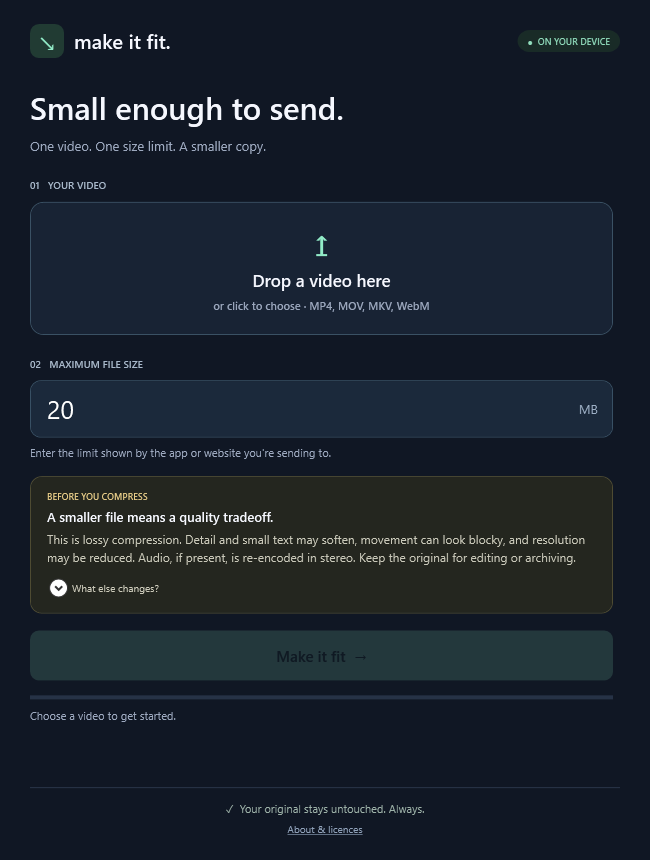
- 01
Drop your video.
A screen recording, phone clip, or something you just exported.
- 02
Choose the limit.
Enter the maximum file size in MB. The app chooses the compression settings.
- 03
Save a smaller copy.
We check the output size before saving. Your original stays untouched.
THE QUALITY TRADEOFF
Know what changes.
Keep the original.
We choose settings to meet your size limit. We don’t promise the same quality in a smaller file. A tighter limit can mean a more noticeable change.
- Picture
- Re-encoded as 8-bit H.264. Fine detail and text may soften; motion may look blocky. Resolution can fall and is capped at 1,920 pixels on the long edge, often lower for tight limits.
- Sound
- Re-encoded as stereo AAC at 48 or 96 kb/s when audio is present. Surround sound and additional audio tracks are not preserved.
- Other tracks
- Only the first video and audio track are kept. Subtitles, chapters and source metadata are removed. HDR video is not supported.
- Original
- Untouched. A smaller copy is saved separately. Keep the original for editing, archiving, or another compression attempt.
ACTUAL GENERATED TEST CLIP · 8 SECONDS
Target: under 0.5 MB. Audio and duration retained.
This is a synthetic test, not a promise of the same reduction or perceived quality for your video.
Check the picture, small text and sound. If the result is too soft, try a larger limit or send the original another way.
Your files stay with you.
No video uploads. No app account. No analytics. After you download the free video engine during first setup, compression works offline.
First setup connects directly to GitHub to download FFmpeg (about 115 MB). GitHub receives the usual connection information; your videos are never sent.
A few things to know.
What do I get for US$8?
The current Windows app, with unlimited local compressions and no subscription or app account. You pay for the simple app and workflow. The separate FFmpeg engine is free software. Future major versions are not promised as part of this purchase. Applicable tax is shown at checkout.
Do I need to install anything else?
You do not need to install .NET. Open the app and choose “Set up video engine” once. This downloads about 115 MB directly from the engine provider’s GitHub release and verifies the download before setup. You need internet for that step and enough free space for the engine and temporary video files.
Which videos work?
The initial release targets standard-colour (SDR) MP4, MOV, MKV and WebM videos on Windows 10/11 x64. HDR video is not supported. Output is MP4 using H.264 video and AAC audio. Only the first video and first audio track are kept; subtitles, extra audio tracks, chapters, and source metadata are not retained.
Will it keep the same quality?
No. This is lossy re-encoding. Detail and small text can soften, motion can look blocky, resolution can be reduced, and audio is converted to stereo AAC at 48 or 96 kb/s. Tighter limits generally increase the tradeoff. Actual quality depends on the source and content; a retry may lower it further. Your original is never overwritten. Preview the copy before sharing.
How long does it take?
It depends on your computer and the video. The app processes the whole video twice, and can retry if the output is above your limit. A long video can take several minutes or more. You can cancel.
Where are support and refunds handled?
Your purchase receipt provides the seller's contact and download access. Any published refund policy supplements your statutory consumer rights. Purchases are not open in this preview.
KEEP IT SIMPLE
Make it small.
Get on with your day.
One-time purchase · Windows x64